Changelog

Follow new updates and improvements to Scenario.

Scenario v4.0

Mac and Windows native apps, plus an easier “Visibility” editor for diagrams

  • Released July 27, 2026

  • Availability: all devices, all accounts

Mac and Windows apps

We’re releasing two native apps for Mac and Windows computers!

  • Take advantage of larger screens, without the web browser bars

  • Download directly from the Scenario website, so it’s not managed through an App Store

  • Check for new versions, and download them directly in the app

  • Allows easier subscription management and invoices through Stripe

  • Fixes all known issues with zooming diagrams and text entry, on Silicon Macs

  • Note: if you have the existing Silicon Mac version, delete it and download the new one. The previous version is no longer available in the Mac App Store.

Go to scenario.film/start-now to download now!

Item visibility

We’ve moved the Layers > Types table, the grid controls, and the feet/meters option into the new Visibility sidebar.

  • Easy to find and toggle, with a lower-left button or the V key

  • Quickly hide or lock all items of a certain type, to focus on what’s most important to your work

v4.0.1

Bug fixes:

  • Multi-selected Groups can be moved together

  • Multi-selected Groups and Frames can be rotated together

  • Possible error message when targeting items

  • Added a “Return to Scenario” button for desktop app login through Google or Apple
NewDiagrams

Scenario v2.9

Keeping your work safe with a new “Deleted” folder, and some design updates.

  • Released December 23, 2025

  • Availability: all devices, all accounts

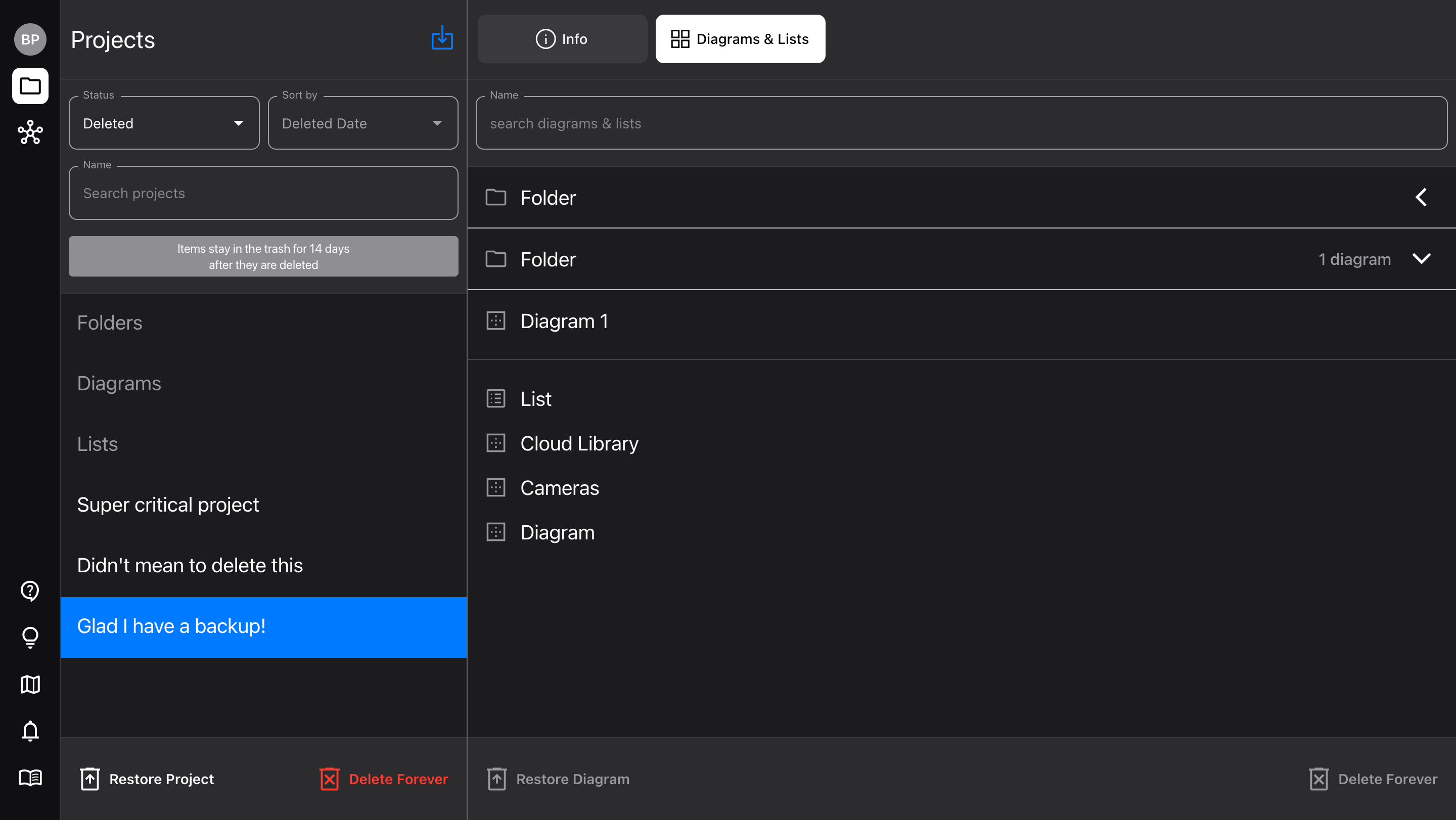
“Deleted” view

Although it’s possible to “undo” deleting a Project, Diagram, or List, sometimes mistakes happen, and you may find that one of them got away. But now there’s good news: it’s not gone!

To recover a deleted file, go to the Projects view (close the Diagram if you’re in one), and in the Project “status” drop-down, select “Deleted.”

  • This shows all your deleted Projects, with the most recently deleted first

  • Deleted Folders, Diagrams, and Lists can be found in the “container projects” with those names

  • Select an item to “Restore” it to its original parent context

  • Items stay in the “Deleted” view for 14 days after being deleted

Projects sidebar updates

We’ve simplified how selecting items works in the Project sidebar, so it’s easier to tell what’s actually selected.

  • Only one item is selected at a time (with the blue highlight)

  • The visible Diagram (and sometimes List) show the “eye” icons

  • Using the bottom “Duplicate” and “Delete” buttons will always perform that action on the selected item

Bug fixes

  • Fixed an issue that saved a .txt file with Diagram PDFs

NewImproved

Scenario v2.8

Starting now, we’re sending version updates to all users via email. If you’d like to unsubscribe from email updates, click the link at the bottom of the email. You can always find these updates in the bottom left corner of the app Projects view, and new updates will still appear when you open the app.

Lots of new features, including Markup, new items, and more!

  • Released December 12, 2025

  • Availability: all devices, all accounts

Markup improvements

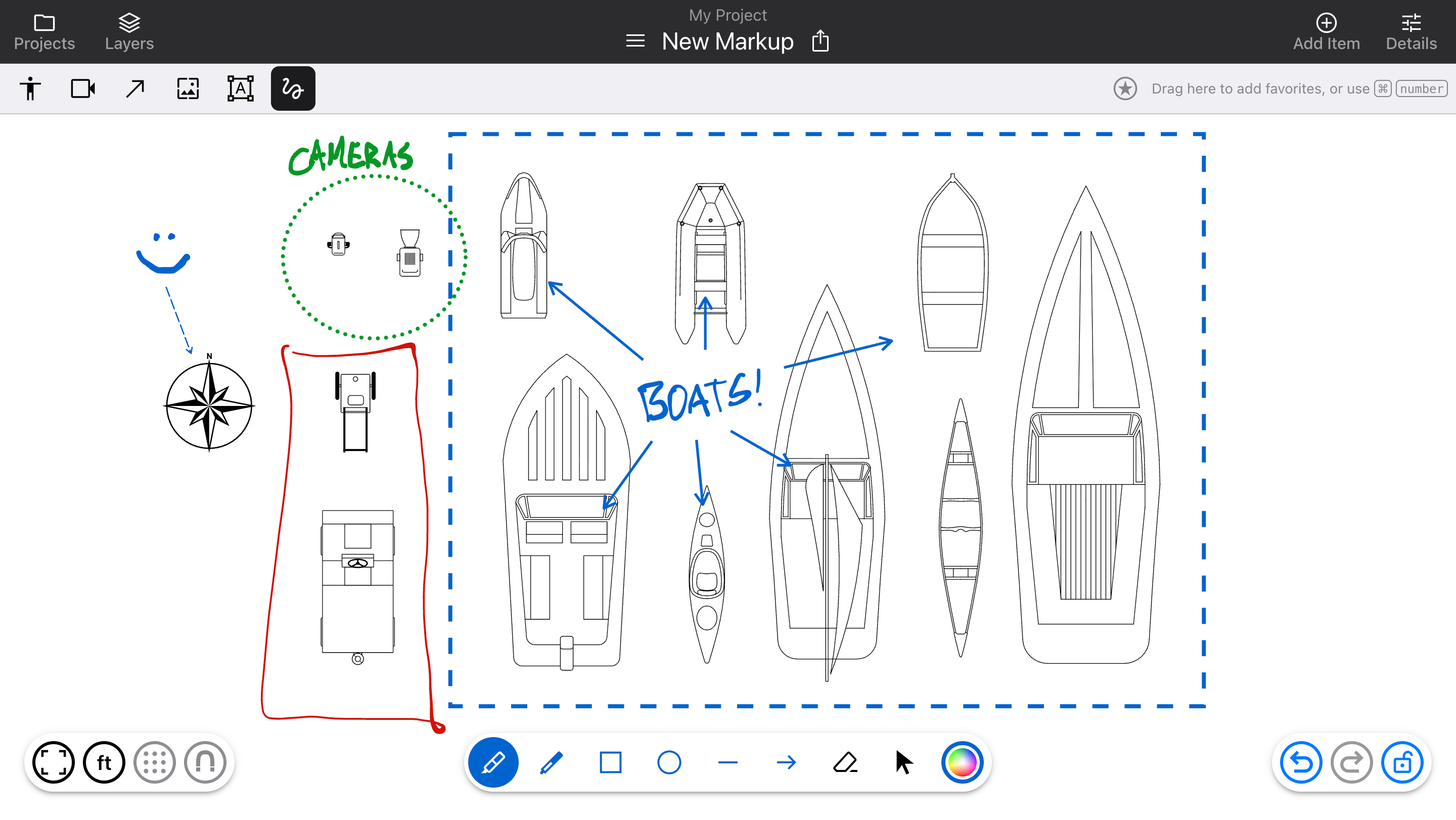
Markup no longer creates individual layers, which become difficult to manage and make it hard to select other items. Now, it all stays in one layer above the rest. Use the top left button (or M key) to toggle it on and off.

  • Added new tools: Marker and Pen (which replace the single “Draw” tool), plus Rectangle, Ellipse, Line, and Arrow

  • Once added, a Markup item can be resized, and have its style changed (color, thickness, dotted/dashed/solid). Use the “Select” pointer tool and click on items to see the options.

Diagram editor updates

  • Arrows can now be connected to Text items, for flowchart functionality

  • Hold the Option or Alt key and drag an item to duplicate it quickly

  • Added a generic “Item” type, for items that don’t use targeting (like props and landscaping)

  • Support for HEIC format images

  • Request new Cloud Library fixtures directly from the Add Item sidebar

New items

Cameras:

  • Underwater Camera

Fixtures:

  • Canoe

  • Kayak

  • Raft

  • Rowboat

  • Sailboat

  • Jet Ski

  • Fishing Boat

  • Speedboat

Items:

  • Compass

Bug fixes

  • Fixed an issue where text would not be rotated properly on PDFs

  • Rotating items clockwise from “upright” would cause a small jump in rotation

NewImprovedFixed

Earlier updates